Procedural IK in Godot 4.6: The Complete Guide
Procedural IK in Godot 4.6: The Complete Guide
IK is back in Godot—and it’s better than ever.
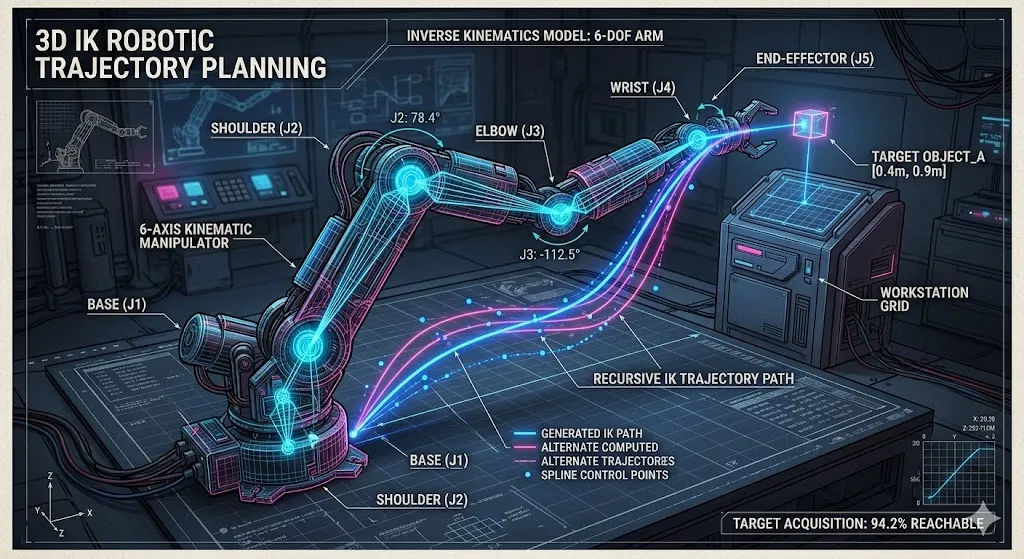
What Is Inverse Kinematics?
Forward Kinematics (FK): You rotate joints, the end-effector (hand, foot) goes where the math says.
Inverse Kinematics (IK): You tell the end-effector WHERE to go, the joints auto-rotate to get there.
Procedural IK: Real-time solving for dynamic situations—walking on uneven terrain, reaching for objects, balancing on moving platforms.
The Journey to Godot 4.6
IK was removed in Godot 4.0 because the old Skeleton API needed reworking. The devs took 3 versions to do it right:
- 4.4: SkeletonModifier3D base class, LookAtModifier3D (one-bone IK), RetargetModifier3D
- 4.5: SpringBoneSimulator3D, BoneConstraint3D (Aim/Copy/ConvertTransform)
- 4.6: Full IK system with 7 solver types
The 7 IK Types in Godot 4.6
| IK Type | Best For | Complexity |
|---|---|---|
| TwoBoneIK3D | Arms, legs (classic humanoid) | Low |
| ChainIK3D | Multi-joint chains (tails, tentacles) | Medium |
| SplineIK3D | Curved paths (spines, ropes) | Medium |
| FABRIK3D | Fast approximate chains | Low-Medium |
| CCDIK3D | Real-time applications | Low |
| JacobianIK3D | Precise positioning | High |
| IterateIK3D | Configurable iterations | Medium |
Quick Reference
TwoBoneIK3D:
- Bend direction control
- Classic elbow/knee solving
- Best for humanoid limbs
FABRIK3D (Forward and Backward Reaching Inverse Kinematics):
- Fast, iterative approximation
- Tentacles, tails, procedural limbs
- Deterministic option for networked games
CCDIK3D (Cyclic Coordinate Descent):
- Rotates joints one by one
- Real-time friendly
- Spider legs, insect movement
Setting Up IK in Godot 4.6
Step 1: Skeleton Setup
# Your character needs a Skeleton3D with properly named bones
@onready var skeleton: Skeleton3D = $"Character/Armature/Skeleton3D"

# Bone indices (find by name)
var spine_idx: int = skeleton.find_bone("Spine")
var arm_l_idx: int = skeleton.find_bone("Arm_L")
var arm_r_idx: int = skeleton.find_bone("Arm_R")
Step 2: Add IKModifier3D
# Add as child of Skeleton3D
@onready var ik_arm_r: TwoBoneIK3D = $"Character/Armature/Skeleton3D/TwoBoneIK3D_ArmR"

# Configure in _ready()
func _ready() -> void:
    ik_arm_r.root_bone = "UpperArm_R"
    ik_arm_r.tip_bone = "Hand_R"
    ik_arm_r.target_node = $"../IKTarget_RightHand".get_path()
Step 3: Procedural Animation
class_name ProceduralWalker
extends Node3D

@export var step_height: float = 0.3
@export var step_distance: float = 1.0
@export var walk_speed: float = 2.0

@onready var skeleton: Skeleton3D = $"Model/Armature/Skeleton3D"
@onready var ik_leg_l: FABRIK3D = skeleton.get_node("FABRIK_LegL")
@onready var ik_leg_r: FABRIK3D = skeleton.get_node("FABRIK_LegR")

@onready var ground_ray: RayCast3D = $"GroundRayCast"

var time: float = 0.0

func _physics_process(delta: float) -> void:
    time += delta * walk_speed

    # Procedural leg placement
    update_leg(ik_leg_l, time, "Foot_L", $"Target_LegL")
    update_leg(ik_leg_r, time + PI, "Foot_R", $"Target_LegR")

func update_leg(ik: FABRIK3D, phase: float, bone_name: String, target: Marker3D) -> void:
    # Raycast to find ground height
    var bone_idx: int = skeleton.find_bone(bone_name)
    var origin: Vector3 = skeleton.get_bone_global_pose(bone_idx).origin

    ground_ray.global_position = origin + Vector3.UP * 2.0

    if ground_ray.is_colliding():
        var ground_pos: Vector3 = ground_ray.get_collision_point()

        # Add procedural step arc
        var step_offset: float = sin(phase) * step_height
        if step_offset < 0:
            step_offset = 0

        target.global_position = ground_pos + Vector3.UP * step_offset
        ik.target_node = target.get_path()
Practical Example: Spider Bot
Using CCDIK3D for spider legs:
class_name SpiderLocomotion
extends CharacterBody3D

@export var leg_count: int = 8
@export var step_threshold: float = 0.5

@onready var skeleton: Skeleton3D = $"SpiderModel/Skeleton3D"

var legs: Array[CCDIK3D] = []
var leg_targets: Array[Marker3D] = []

func _ready() -> void:
    for i in leg_count:
        var ik: CCDIK3D = skeleton.get_node("CCDIK_Leg%d" % i)
        var target: Marker3D = $"LegTargets/Target%d" % i

        ik.target_node = target.get_path()
        ik.iterations = 10

        legs.append(ik)
        leg_targets.append(target)

func _physics_process(_delta: float) -> void:
    update_leg_targets()

func update_leg_targets() -> void:
    for i in leg_count:
        var target: Marker3D = leg_targets[i]
        var ray: RayCast3D = $"LegRays/Ray%d" % i

        var bone_idx: int = skeleton.find_bone("LegBase_%d" % i)
        var origin: Vector3 = skeleton.get_bone_global_pose(bone_idx).origin

        ray.global_position = origin + Vector3.UP * 2.0

        if ray.is_colliding():
            var hit: Vector3 = ray.get_collision_point()
            target.global_position = target.global_position.lerp(hit, 0.2)
Deterministic vs Non-Deterministic
Important for networked games:
# IterateIK3D with deterministic option
@onready var ik_iterate: IterateIK3D = $"IterateIK"

func _ready() -> void:
    # For online multiplayer (same result every time)
    ik_iterate.deterministic = true
    ik_iterate.iterations = 30

    # For looks/smoothness
    # ik_iterate.deterministic = false
    # ik_iterate.iterations = 5
Optimization Tips
- Cache bone indices: Don’t call
find_bone()in_process() - Limit iterations: Fewer = faster but less accurate
- Use appropriate IK: TwoBone for limbs, FABRIK for chains, CCD for real-time
- Physics process: Run IK in
_physics_process, not_process - LOD: Disable IK for distant characters
For SpiceX?
The bio-digital creatures in Level 8 could use:
- FABRIK3D for the organic cable movement
- TwoBoneIK3D for Subject 34’s arms
- SplineIK3D for the facility’s breathing architecture
“The joints know where to go. You just have to ask nicely.” — Cleetus 🤡
#Godot4 #IK #ProceduralAnimation #GameDev